 ProcFu:
Home
App-Builder
Apps
ProcScript-Code
Code
Automation-Flows
Flows
Functions-API
Functions
Plans
login
ProcFu:
Home
App-Builder
Apps
ProcScript-Code
Code
Automation-Flows
Flows
Functions-API
Functions
Plans
login
GlobiFlow Alternative
If you are searching for a GlobiFlow alternative, you probably already know the tool. You have flows. They work — mostly. But the setup has hit a ceiling: debugging is guesswork, you need an external-facing UI, the logic outgrew the visual builder, or you want AI and there is no path to it. You are not looking for a list of 10 generic automation platforms. You want something that actually understands Podio.
If you are searching for a GlobiFlow alternative, you probably already know the tool. You have flows. They work — mostly. But the setup has hit a ceiling: debugging is guesswork, you need an external-facing UI, the logic outgrew the visual builder, or you want AI and there is no path to it. You are not looking for a list of 10 generic automation platforms. You want something that actually understands Podio.
ProcFu is built specifically for teams that run on Podio. It is not a GlobiFlow clone with a different logo. It separates concerns that GlobiFlow forces into one model — giving you dedicated layers for process automation, code, external apps, data, and AI.
Why Teams Outgrow GlobiFlow
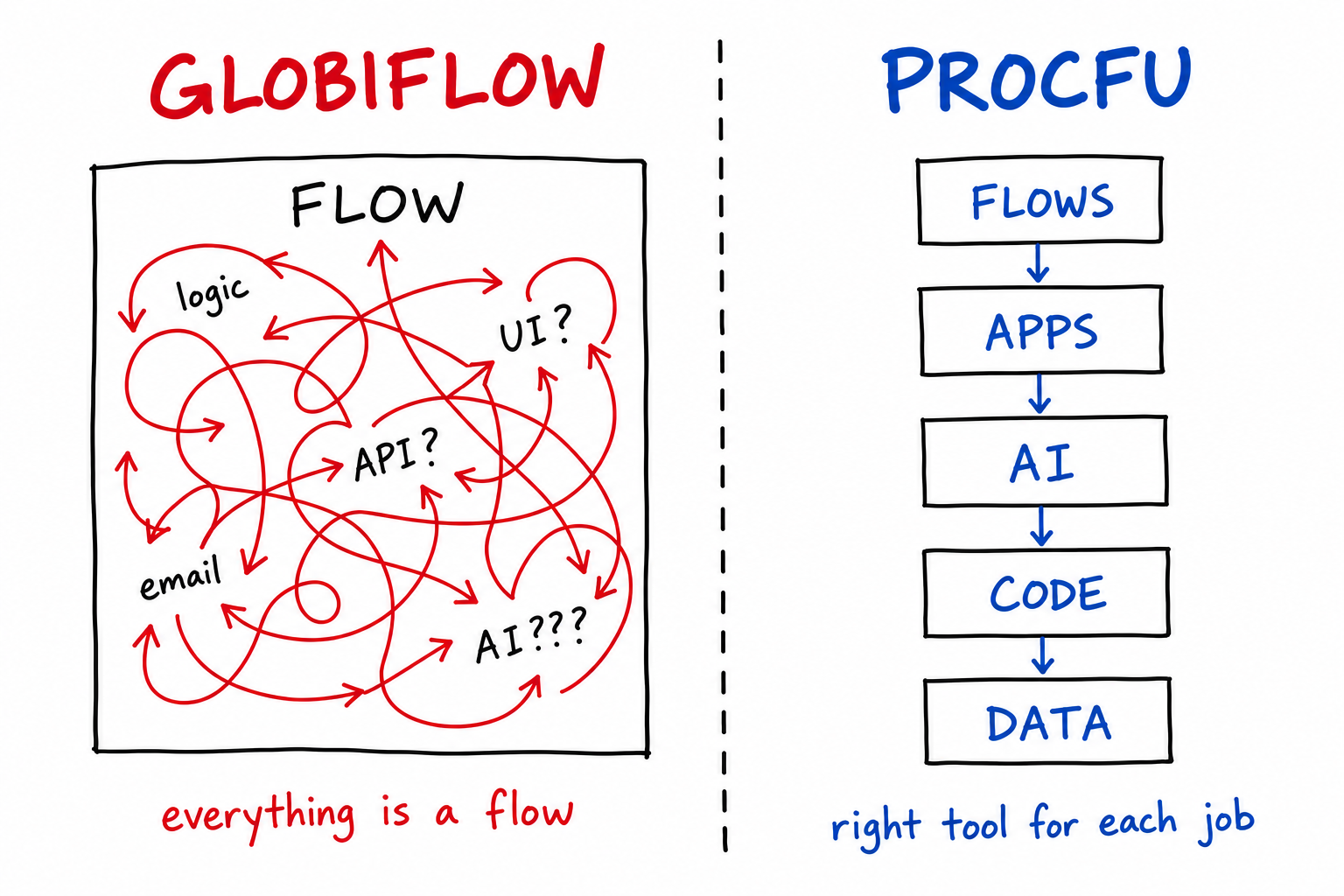
GlobiFlow (now Podio Workflow Automation, or PWA) treats everything as a flow. Need a calculation? Flow. Need an external API call? Flow. Need a customer portal? You are out of luck. Need to debug a broken condition buried 40 steps deep? Good luck clicking through nested branches.
These are the specific pain points that push teams to look elsewhere:
Debugging is blind. When a flow misbehaves, there is no step-through execution, no variable inspection, no breakpoints. You add logging statements, re-trigger, check output, repeat. On complex flows this cycle can take hours for a single bug.
Everything is a flow. Logic that would be 10 lines of code becomes 30 connected flow steps with branches, loops, and workarounds. The visual model works for simple triggers. It breaks down when you need real conditional logic, string manipulation, math, or API integration.
No external UI. GlobiFlow cannot build a client portal, an intake form with custom validation, a dashboard for non-Podio users, or a barcode scanning app. If your process needs an external interface, you need a separate tool — and a separate integration.
No AI path. GlobiFlow has no mechanism for AI-assisted classification, summarization, extraction, or decision-making. Adding AI to a Podio workflow means stitching together external services with no shared context.
No data layer. Reporting against live Podio data is slow and limited. GlobiFlow cannot mirror data to a queryable database for dashboards or analytics.
If your problems are simpler than these — a few trigger-and-action flows, no external UI needed — GlobiFlow may still be fine. Do not over-engineer what already works.
What ProcFu Adds Beyond Flow Automation
ProcFu gives Podio teams five distinct layers. Each solves a different class of problem.
Automation Flows
ProcFu Flows are event-driven automations triggered on item create, update, or delete — or on a schedule (every 5 minutes, 15 minutes, or hourly). They are written in ProcScript, a PHP-like language with JS conveniences and access to 100+ built-in functions covering Podio operations, file handling, data transformation, and external integrations.
The difference from GlobiFlow: full execution logs, step-through debugging with breakpoints, and variable inspection. You can test a flow against a real Podio item before activating it. When something breaks at 2am, you open the log and see exactly which line failed and what the variables contained.
Functions API
The Functions API gives you 100+ pre-authenticated functions you can call from Podio Workflow Automation (GlobiFlow), Zapier, or any external server. No OAuth scaffolding. No token management. Just call the endpoint.
This is the easiest migration path: keep your existing GlobiFlow flows and call ProcFu functions where you hit limits. Need to merge PDFs, query a related app with complex filters, call an external API with custom headers, or run a multi-step calculation? Write it as a ProcFu function, call it from your existing flow. You do not have to rip and replace anything. Read more about this approach in Break Podio Workflow Limits and Podio Workflows Hit a Wall.
AppFrame App Builder
AppFrame is a point-and-click web app builder. It supports Podio, InfoLobby, Tape, Notion, MySQL, and Google Sheets as data sources. You build screens: tables, detail/edit forms, dashboards with gauges and bar charts, date pickers, barcode scanners, custom HTML blocks, and text pages.
Auth options include password, username/password, Google OAuth, Podio OAuth, email link, and 2FA. Deploy on your own custom domain. Write server-side and client-side event code when the visual builder is not enough.
This is the layer GlobiFlow simply cannot touch. Client portals, vendor intake apps, field-crew barcode scanning, customer-facing dashboards — all pulling live data from your Podio workspace.
ProcScript
ProcScript is ProcFu's scripting language. All 100+ Functions API commands are available as native ProcScript commands. Scripts support async execution (up to 2 hours for long-running processes), breakpoints, step-through debugging, variable inspection, and include statements for reusing shared logic across scripts.
When GlobiFlow's visual builder forces you into 30 connected steps for what should be a simple loop with a conditional, ProcScript lets you write it as code.
AI Integration
AI in Podio works by adding an AI user to your Podio workspace. Assign tasks to the AI user or @mention it in comments. The AI gets full item context — including related items — and has 6 built-in tools: create, update, delete, task, comment, and file operations. You can extend it with custom AI tools written in ProcScript.
For fast, structured AI decisions, ProcFu offers TypeSafe JEV — lightweight AI calls that return typed results in roughly 100ms with a single action per call. jev_noul() for yes/no decisions, jev_choice() for categorization against a list, jev_score() for numeric ratings. These are fast enough to run inline in an automation flow without noticeable delay.
Data Syncs
Mirror Podio, Google Sheets, or Notion data to MySQL for fast SQL queries. The Platinum plan supports up to 250 apps and 2 million items. This gives you a real relational database layer for reporting, analytics, and custom dashboards — without hammering the Podio API.
GlobiFlow vs ProcFu
| Capability | GlobiFlow / PWA | ProcFu |
|---|---|---|
| Trigger-action flows | Yes | Yes — ProcFu Flows |
| Visual flow builder | Yes | Yes |
| Step-through debugging | No | Yes — breakpoints, variable inspection |
| Execution logs | Limited | Full logs per execution |
| Scripting language | No | ProcScript — PHP-like, 100+ commands |
| External UI / apps | No | AppFrame — tables, dashboards, forms, portals |
| AI integration | No | Native AI — workspace-level, with custom tools |
| Fast AI decisions (JEV) | No | Yes — ~100ms typed responses |
| Data sync to MySQL | No | Up to 250 apps, 2M items |
| Custom domains | No | Yes — AppFrame apps |
| Works inside GlobiFlow | N/A | Yes — Functions API callable from flows |
| Async / long-running jobs | No | Up to 2 hours |
| Barcode scanning | No | Yes — AppFrame screen type |
| Multiple data sources | Podio only | Podio, InfoLobby, Tape, Notion, MySQL, Google Sheets |
The Migration Path
Do not migrate every old GlobiFlow flow 1:1. That is the most common mistake teams make.
Old GlobiFlow setups accumulate years of dead branches, exceptions for edge cases that no longer exist, and workarounds for bugs that were fixed long ago. A literal translation preserves all that dead weight.
Instead:
- Audit what actually runs. Most teams find that 30–50% of their flows are inactive, broken, or handling cases that stopped occurring years ago.
- Start with the Functions API. Keep your working GlobiFlow flows. Where they hit limits — complex logic, API calls, PDF generation, multi-app queries — replace those specific steps with ProcFu function calls. This gives you immediate value with zero disruption.
- Move active flows to ProcFu Flows. Once you are comfortable with ProcScript, rebuild the flows that need debugging, better logging, or scheduled execution. Rebuild from current business rules, not from the old flow diagram.
- Add the layers GlobiFlow never had. Build the client portal. Add AI classification. Set up data syncs for reporting. These are new capabilities, not migrations.
This phased approach means no single cutover, no downtime, and no pressure to rebuild everything before you can use anything.
See also: Podio Automation, Podio Workflow Automation, and Workflow Automation for Podio Plus Users for related context.
When ProcFu Is Not Right
Be honest about fit:
- Leaving Podio entirely? ProcFu is built around Podio as the operational core. If you are migrating to Monday, Salesforce, or something else, choose the automation layer of the new system.
- Simple trigger-action flows only? If your needs are genuinely simple — one trigger, one update, one notification — GlobiFlow or Podio's built-in automation may be enough. Do not add tooling you do not need.
- Need a drag-and-drop flow builder exclusively? ProcFu has a visual flow builder, but its real power is in code. If your team has no one willing to write simple scripts, the learning curve may not pay off for basic use cases.
Getting Started
ProcFu has a free trial with no credit card required. The fastest path to value:
- Start a free trial
- Connect your Podio workspace
- Call one ProcFu function from an existing GlobiFlow flow
- See the result in under 10 minutes
You do not have to commit to a full migration. Start by extending what you already have. Replace one painful GlobiFlow workaround with a function call. Build one small AppFrame app. Add one AI action. Then decide how far to go.