 ProcFu:
Home
App-Builder
Apps
ProcScript-Code
Code
Automation-Flows
Flows
Functions-API
Functions
Plans
login
ProcFu:
Home
App-Builder
Apps
ProcScript-Code
Code
Automation-Flows
Flows
Functions-API
Functions
Plans
login
Podio Automation
Podio automation covers everything that reduces manual work around Podio: record-driven workflows, scheduled jobs, API integrations, external-facing apps, data syncs, and AI-assisted decisions. This page maps the full landscape and where each tool fits.
Podio automation covers everything that reduces manual work around Podio: record-driven workflows, scheduled jobs, API integrations, external-facing apps, data syncs, and AI-assisted decisions. This page maps the full landscape and where each tool fits.
If you are specifically looking for event-driven trigger-action flows, see Podio Workflow Automation. This page is the broader picture.
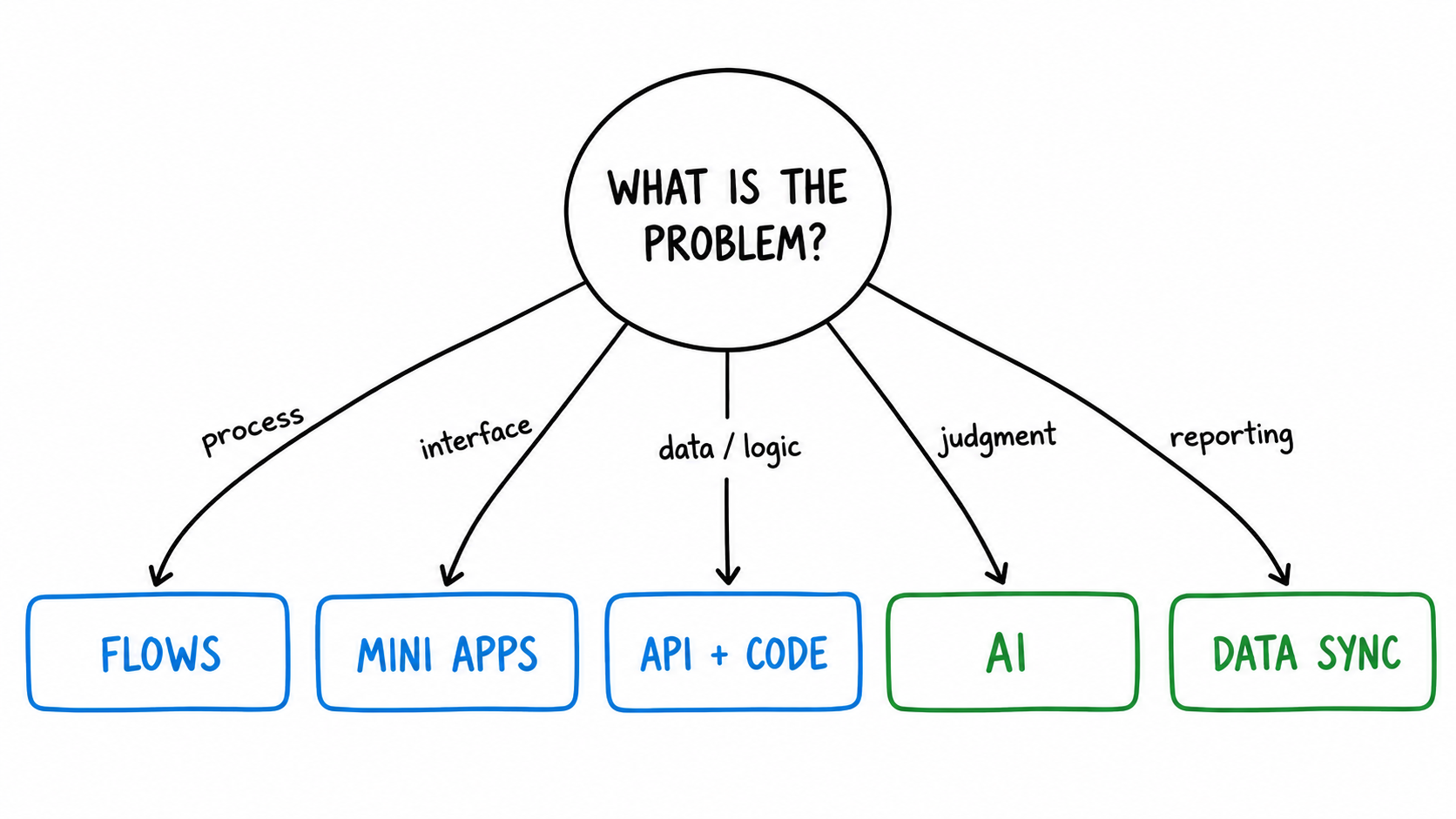
The Automation Landscape Around Podio
There is no single automation tool that covers every Podio use case well. The options break into distinct categories, and most serious Podio teams combine more than one.
Native Podio Workflows
Built into Podio Premium. You define simple trigger-action rules: when a status changes, update a field, send a notification, create a task. No code, no external tools.
Good for: basic notifications, field updates, task creation. When the rule is one trigger and one action, Podio handles it fine.
Limits: only available on Premium or higher plans. No conditional branching. No looping. No external API calls. No debugging tools. When rules interact, they become hard to reason about. If you are on Podio Plus, you get none of this. See Workflow Automation for Podio Plus Users.
ProcFu Automation Flows
ProcFu Flows run on item create, update, or delete, or on a schedule (every 5 minutes, 15 minutes, or hourly). They are written in ProcScript, a scripting language with 100+ built-in functions for Podio operations, email, HTTP, math, date logic, and more.
Key differences from native Podio workflows:
- Works on any Podio plan, including Plus. ProcFu connects via Podio's API, so it does not depend on Premium-tier features.
- Step-through debugging with breakpoints. You can walk through a flow line by line, inspect variables at each step, and see exactly where logic diverges. This alone saves hours when a process breaks.
- Conditional logic, loops, and subroutines. ProcScript is a real scripting language, not a rule builder. You can branch on any field value, iterate over related items, and call reusable functions.
- Scheduled execution. Native Podio workflows only fire on record events. ProcFu flows can run on a timer to catch stale items, approaching deadlines, or recurring cleanup tasks.
Example: a lead intake flow that auto-assigns owners by service type, sets due dates, creates checklists, sends acknowledgment emails within an hour, and escalates overdue items. That is one ProcFu flow. Doing the same in native Podio workflows would require multiple disconnected rules with no way to debug the chain. Read the full walkthrough: Stop Losing Leads.
Functions API
The Functions API lets you call ProcScript functions from existing GlobiFlow/PWA flows, Zapier steps, Make scenarios, or any external server that can make an HTTP request.
This is the bridge layer. You do not have to replace your current automation to get ProcFu's capabilities. Write a function in ProcScript, call it via the API, and get the result back. The function runs pre-authenticated against your Podio account, so you do not need to manage OAuth tokens in your calling system.
Use cases: complex field calculations that GlobiFlow cannot express, data lookups across multiple Podio apps, validations that hit external APIs, formatted PDF generation, or anything where you need more logic than your current automation tool supports.
Mini Apps
Mini Apps are user-triggered actions that live outside the normal Podio UI. They are built with AppFrame, a point-and-click builder, and can be anything from an approval button to a full intake form to a client status portal.
Auth options: Google, Podio, email magic link, password, or 2FA. You control who sees what.
This is automation in the sense that it replaces manual Podio data entry, but it is triggered by people rather than events. An external customer submits a form, and the data flows into Podio with all the right field mappings, related items, and follow-up tasks already created. No one copies and pastes from an email.
See also: Podio Customer Portal, Podio App Builder.
Data Syncs
ProcFu can mirror Podio data to MySQL. Up to 250 apps, 2 million items. The sync runs continuously in the background.
Why this matters for automation: Podio's API is slow and rate-limited. Complex queries across multiple apps are impractical in real time. With synced data in MySQL, you can run fast queries, build dashboards, detect patterns across large datasets, and feed the results back into Podio actions. The reporting layer becomes the input for the next automation step.
AI Actions
AI in Podio through ProcFu means the AI gets full item context: all fields, comments, related items. It can summarize, classify, extract structured data, draft responses, or route items based on content analysis.
Two execution modes:
- Standard AI calls for longer analysis, drafting, and multi-step reasoning.
- JEV (JSON Extraction/Validation) for fast structured decisions. ~100ms response time. Good for classification, field extraction from text, and routing logic.
AI actions can also call custom tools written in ProcScript. The AI can look up related data, check external APIs, or trigger follow-up actions as part of its reasoning. This is not a chatbot bolted onto Podio. It is AI with access to your operational data and 100+ ProcScript functions.
Read the full guide: AI in Podio.
Zapier and Make
Zapier and Make connect Podio to other SaaS tools: CRM to Podio, Podio to accounting, form submissions to Podio items. They are good at simple cross-platform triggers where the logic is "when X happens in tool A, create/update Y in tool B."
Limits for Podio-specific work: they treat Podio as a generic app. No awareness of Podio's relationship structure, calculation fields, or workspace logic. Complex Podio-to-Podio automation through Zapier becomes a chain of API calls that is hard to debug and expensive at scale. For Podio-heavy logic, ProcFu or native workflows will be more maintainable.
The Functions API bridges the gap: keep Zapier/Make for the cross-platform trigger, but call a ProcFu function for the Podio-specific logic.
What To Automate First
Start with processes that are frequent, boring, and costly when missed:
- Status change follow-ups. When a deal moves to "Won," create the onboarding checklist, assign the account manager, notify the team.
- Stale item detection. Flag items that have not been updated in X days. Escalate to a manager after Y days.
- Approval routing. Route items to the right approver based on value, type, or region. Enforce thresholds.
- Recurring reminders. Renewal tracking at 60, 30, and 7 days before expiration. Escalate if no response. Track customer silence. See Stop Losing Renewals.
- Intake validation. Check required fields, normalize formats, reject incomplete submissions before they enter the pipeline.
- Record cleanup. Archive completed items, merge duplicates, enforce naming conventions.
Avoid automating processes that people do differently every time. Define the rule first, then build the automation.
Real-World Examples
Lead intake system. A services firm receives leads from multiple channels. ProcFu auto-assigns owners by service type, sets due dates based on priority, creates task checklists from templates, sends acknowledgment emails, and escalates items that sit untouched for more than an hour. One flow replaces five manual steps. Full walkthrough: Stop Losing Leads.
Renewal management. A subscription business tracks contract end dates in Podio. ProcFu creates reminder tasks at 60, 30, and 7 days out, escalates overdue renewals to management, and flags customers who have not responded. The team stopped losing renewals to oversight. Details: Stop Losing Renewals.
Quote-to-invoice pipeline. A field services company uses Podio for quoting. ProcFu calculates zone surcharges, enforces approval thresholds above a dollar amount, checks technician availability, processes deposit payments, and spawns work orders across departments. The quoting process went from 45 minutes of manual coordination to under 5 minutes. More on automating Podio Plus without busywork: Podio Plus Without the Busywork.
Choosing the Right Layer
| Problem | Start here |
|---|---|
| Simple field update on status change | Native Podio Workflows |
| Complex conditional logic, loops, debugging | ProcFu Flows |
| Extend existing GlobiFlow/Zapier setup | Functions API |
| External users need to trigger actions | Mini Apps |
| Reporting across large datasets | Data Syncs + Dashboards |
| Classify, summarize, extract from records | AI Actions |
| Cross-platform triggers (Podio to Slack, etc.) | Zapier/Make + Functions API |
If you used GlobiFlow and are evaluating options, see GlobiFlow Alternative.
Pricing
ProcFu counts automation in actions. One action = one flow execution or one function call.
- Free: 100 actions/month
- Bronze ($9/mo): 2,000 actions
- Silver ($25/mo): 10,000 actions + data sync
- Gold ($67/mo): 50,000 actions + priority support
- Platinum ($149/mo): 250,000 actions + VIP support
30-day free trial. No credit card required. See all plans.
Get Started
Start a free trial and connect your Podio account. Build your first flow in under 10 minutes. If you already use GlobiFlow or Zapier, the Functions API lets you add ProcFu logic without changing your existing setup.