 ProcFu:
Home
App-Builder
Apps
ProcScript-Code
Code
Automation-Flows
Flows
Functions-API
Functions
Plans
login
ProcFu:
Home
App-Builder
Apps
ProcScript-Code
Code
Automation-Flows
Flows
Functions-API
Functions
Plans
login
Workflow Automation for Podio Plus Users
Podio's full Workflow Automations (PWA) require Premium-level plans. Podio pricing is per employee. If you have 20 or more users, upgrading every seat from Plus to Premium just to unlock automation becomes a real line item. ProcFu adds workflow automation around Podio while your users stay on Plus. You pay for actions used, not per seat.
Podio's full Workflow Automations (PWA) require Premium-level plans. Podio pricing is per employee. If you have 20 or more users, upgrading every seat from Plus to Premium just to unlock automation becomes a real line item. ProcFu adds workflow automation around Podio while your users stay on Plus. You pay for actions used, not per seat.
This page walks through the cost math, what ProcFu gives Plus teams, and where to start.
The Pricing Problem
Podio has two plan tiers that matter here:
- Podio Plus — lighter built-in automation, lower per-seat cost
- Podio Premium — full PWA with advanced conditions, branching, and integrations, higher per-seat cost
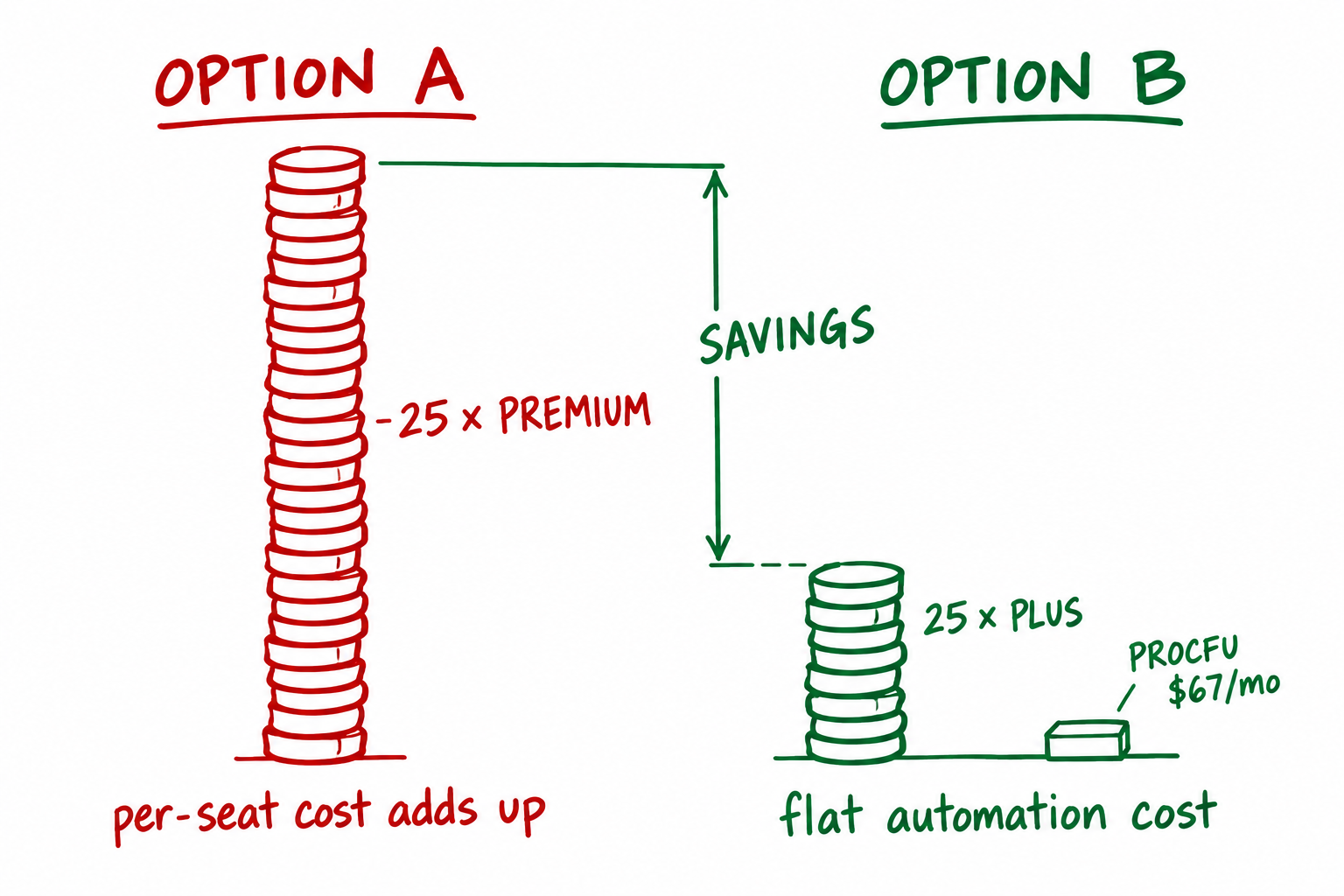
The upgrade cost scales linearly with headcount. Every user needs to be on the same plan. That means if three people need advanced automation, you still upgrade all 25 seats.
Most teams only need advanced automation for a handful of centralized processes: approval routing, status-driven task creation, intake cleanup. The people who benefit from the automation are not the same people who need to be on Premium. The receptionist entering data and the ops manager designing the workflow are on the same plan, paying the same price.
This is the core mismatch: automation complexity is a process-level need, but Podio prices it as a per-user feature.
There is also a timing problem. Teams often discover they need more automation after they have already committed to Plus for a year. Mid-contract upgrades are painful. Adding ProcFu is a separate purchase that does not require changing your existing Podio agreement.
The ProcFu Alternative
ProcFu sits beside Podio. It connects to the same workspaces, reads and writes the same items, and runs automation logic independently of what Podio plan your users are on. A Plus team gets the same ProcFu capabilities as a Premium team.
ProcFu pricing is based on monthly actions — API calls, flow executions, AI invocations — not on how many people log into Podio.
ProcFu Plans
| Plan | Actions/month | Price | Includes |
|---|---|---|---|
| Free | 100 | $0 | Try it out |
| Bronze | 2,000 | $9 | Light automation |
| Silver | 10,000 | $25 | Data sync: 10 apps, 100k items |
| Gold | 50,000 | $67 | Priority support, 50 apps, 500k items |
| Platinum | 250,000 | $149 | VIP support, 250 apps, 2M items |
| Custom | up to 2.5M | $641 | Enterprise volume |
30-day free trial, no credit card required. See full pricing details.
Cost Comparison: A Team of 25
Suppose you have 25 Podio users on Plus. You need stronger automation for intake processing, approval routing, and status-driven notifications.
| Option | Monthly cost | Notes |
|---|---|---|
| Upgrade all 25 seats to Premium | 25 x per-seat upgrade cost | Everyone pays more, even users who never touch a workflow |
| Keep Plus + ProcFu Gold | $67/month flat | Same automation power, no per-seat increase |
The exact Podio per-seat upgrade cost changes, but the structure does not: it multiplies by headcount. ProcFu's cost stays flat whether you have 10 users or 200. At 25 seats, even a modest per-seat price difference makes ProcFu the cheaper path by a wide margin.
The bigger your team, the wider the gap. At 50 seats, the Podio upgrade doubles. ProcFu Gold is still $67.
There is also a scaling question. If your automation needs grow, ProcFu scales by plan tier, not by adding seats. Moving from Gold to Platinum is $82/month more. Adding 25 more Podio Premium seats costs 25 times the per-seat price. The economics get more lopsided as the organization grows.
What ProcFu Gives Plus Teams
Five capabilities that work regardless of Podio plan:
1. Flows
Full event-driven automation. Triggers fire on item create, update, or delete. Scheduled runs handle recurring jobs. Logic is written in ProcScript, a purpose-built language for Podio operations. Flows include step-through debugging so you can trace exactly what happened and why. No Premium plan required — flows run through ProcFu's own connection to the Podio API. For more on how flows work, see Podio Plus Without the Busywork.
2. Functions API
If your Plus team still has access to some native Podio workflow rules, you can call ProcFu functions from within those rules. This gives lightweight Podio automations access to ProcFu's full scripting, AI, and integration capabilities. Think of it as extending what Plus already offers rather than replacing it.
3. Mini Apps
Client portals, intake forms, approval screens, status dashboards — built with AppFrame and served on your own domain or a ProcFu subdomain. External users interact with these apps without needing a Podio license at all. Data flows back into Podio items. This is how teams avoid buying external Podio licenses for clients, vendors, or field workers.
4. AI Tools
Summaries, classification, data extraction, and drafting — connected directly to Podio records. JEV (Just Enough Verification) handles fast yes/no decisions at 1 action per call. Useful for triaging incoming requests, categorizing support items, or generating short summaries of long comment threads. No separate AI subscription required.
5. Data Sync
Mirror Podio apps to MySQL for reporting. Query your data with SQL instead of hitting the Podio API repeatedly. Eliminates API rate limits for read-heavy reporting. Available from the Silver plan up. Useful when you need dashboards, exports, or cross-app reports that Podio's built-in views cannot handle.
Good First Automations for Plus Teams
Start with workflows that are frequent, easy to verify, and obviously valuable. These are the ones that justify the setup time within the first week:
Status-driven task creation. When a deal or project changes status, create the next task automatically. Most teams do this manually today — someone checks a view, notices a status change, creates a task. That gap is where things fall through.
Overdue approval notifications. When an approval item has been sitting untouched past its due date, notify the responsible person. Simple trigger, clear action, high value for compliance-heavy teams.
Intake data cleanup. When a form is submitted — whether through a Mini App or a Podio webform — clean and normalize the data before it lands in the app. Trim whitespace, fix capitalization, validate required fields, reject garbage.
File-triggered updates. When a client uploads a file to a Podio item, update related records: set a status to "documents received," timestamp the upload, notify the case owner.
Comment thread summaries. When a support item accumulates many comments, generate a short AI summary. Saves the next person from reading 40 messages to understand where things stand.
Lead assignment and acknowledgment. When a new lead arrives — from a webform, an email parse, or an API call — auto-assign it by service type or region, set a due date, and send the client an acknowledgment. This is the automation from Stop Losing Leads in practice.
What Not To Automate
Do not automate a process that nobody can explain consistently. If each team member handles the work differently, the first job is process design, not automation.
Also avoid replacing native Podio rules that already work fine. If a simple Plus-level workflow handles a notification correctly, leave it alone. ProcFu is for the gaps, not for rebuilding what is not broken.
And do not automate low-volume work just because you can. If a task happens twice a month and takes two minutes, a human is fine. Spend the automation budget on the workflows that run dozens or hundreds of times per week.
How To Decide
Count the seats first, then count the workflows.
If many people need Podio access but only a few processes need advanced automation, ProcFu is almost certainly cheaper than a full Premium upgrade. The break-even point is low — even a team of 10 will usually save money, and at 25+ seats it is not close.
If your team is small enough that the per-seat upgrade is trivial, Premium may be simpler. But even then, ProcFu offers capabilities that Premium does not: Mini Apps, AI, Data Sync, and a real scripting language.
The free trial gives you 30 days and 100 actions to test whether ProcFu fits your workflow before committing.
Related
- ProcFu Flows — how automation works in ProcFu
- Functions API — extend Podio workflows with ProcFu functions
- AppFrame App Builder — build portals and forms for external users
- Plans and Pricing — full plan comparison
- Podio Automation — broader automation overview
- Podio Workflow Automation — general PWA context
- GlobiFlow Alternative — migrating from GlobiFlow
- Podio Client Portal — external-facing apps
- Blog: Podio Plus Without the Busywork
- Blog: Stop Losing Leads